
-p-1080.webp)






Why Technical SEO Is The Foundation Your Rankings Are Built On

If you're wondering how can i audit my website for technical seo, here's the quick answer:
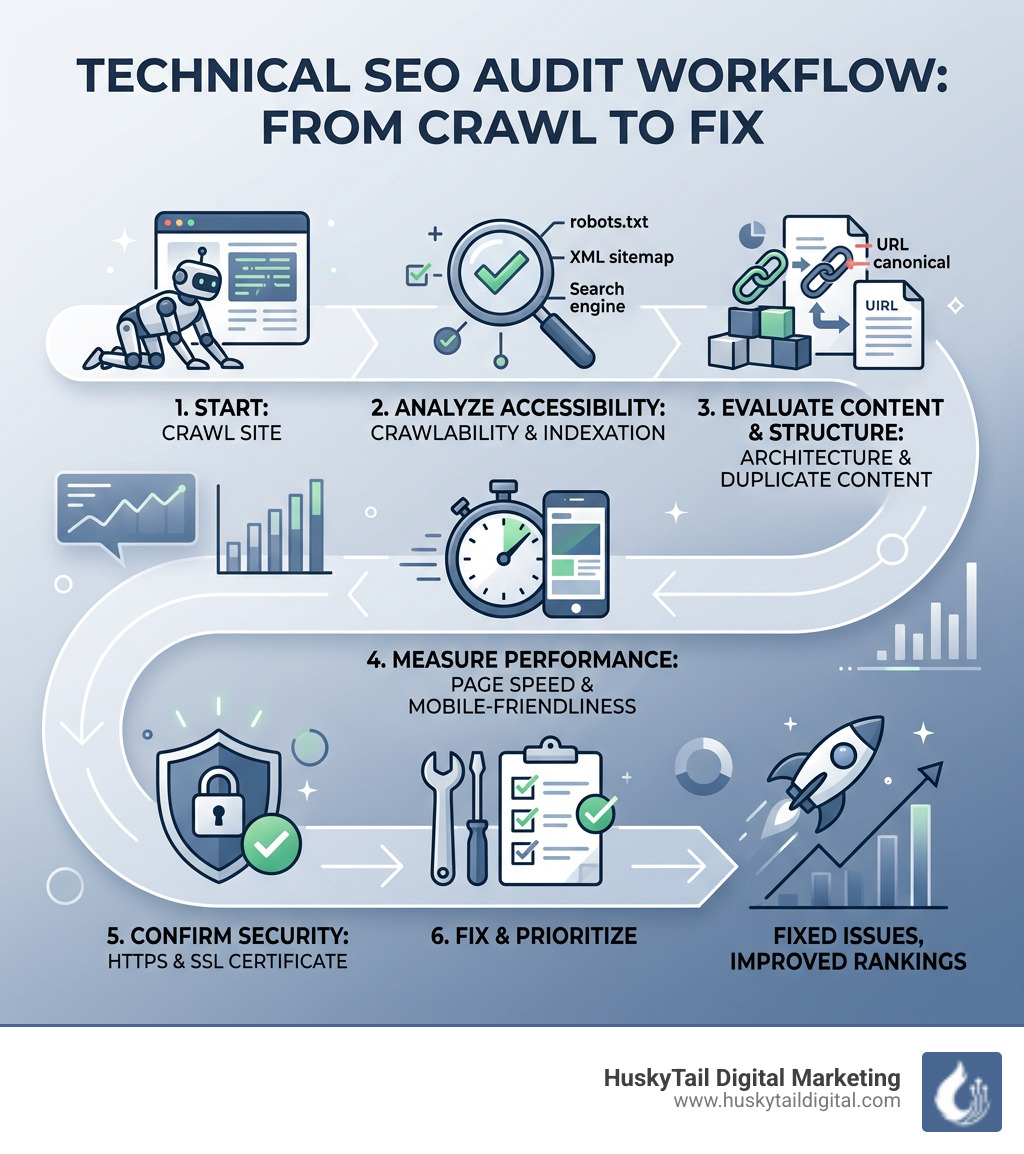
How to audit your website for technical SEO (quick steps):
- Crawl your site with a tool like Screaming Frog or Google Search Console to find errors
- Check crawlability — review your robots.txt and XML sitemap for blocking issues
- Review indexation — confirm your important pages are actually indexed by Google
- Audit site architecture — ensure key pages are reachable within 3 clicks
- Test page speed — use PageSpeed Insights to measure Core Web Vitals (LCP, INP, CLS)
- Check mobile-friendliness — verify responsive design and viewport settings
- Inspect HTTPS and security — confirm your SSL certificate is valid and no mixed content exists
- Find duplicate content — check for canonical tag issues and conflicting URL versions
- Fix broken links and orphaned pages — identify internal linking gaps
- Prioritize and fix — tackle crawlability first, then indexation, then performance
Think of your website like a physical store. You could have the best products in the world — but if the front door is locked, nobody gets in. That's exactly what happens when technical SEO problems block Google from crawling and ranking your pages.
Technical SEO is the infrastructure underneath your website. It doesn't matter how good your content is. If search engines can't find, crawl, and understand your pages, that content won't rank.
The numbers back this up. Google made over 4,500 algorithm changes in a single year. Over 60% of web traffic now comes from mobile devices. And sites with poor technical foundations consistently lose ground — even when their content is strong.
The good news? You don't need to be a developer to run a solid technical audit. With the right tools and a clear process, you can find and fix the issues quietly holding your site back.
I'm Stephen Gardner, founder of HuskyTail Digital Marketing, and over my 20+ years in SEO strategy I've helped businesses recover rankings, fix crawl disasters, and build technical foundations that actually convert — and knowing how can i audit my website for technical seo is always where we start. Let's walk through exactly how to do it.
Essential Tools for Your Technical SEO Audit
Before we roll up our sleeves, we need the right gear. Trying to audit a website without tools is like trying to fix a car engine with your bare hands. You might see the smoke, but you won't find the loose bolt.
At HuskyTail Digital Marketing, we use a mix of free and professional tools to get a 360-degree view of site health. Here is what we recommend for your toolkit:
- Google Search Console: This is your direct line to Google. It tells you exactly which pages are indexed, which ones have errors, and how Googlebot sees your site. It is arguably the most important free tool in your arsenal.
- Screaming Frog SEO Spider: Often called the "gold standard," this desktop crawler mimics how search engines navigate your site. The free version allows you to crawl up to 500 URLs, which is perfect for smaller businesses in cities like Atlanta or Austin.
- Semrush Site Audit: This is a comprehensive, cloud-based tool that categorizes issues into "Errors," "Warnings," and "Notices." It’s great for getting a "Site Health" score that you can track over time.
- PageSpeed Insights: Speed is a confirmed ranking factor. This tool provides both lab and field data on how fast your pages load and where the bottlenecks are.
- SEO Technical Audit Tools: Check out our dedicated guide for a deeper dive into the specific software we use to maintain our clients' rankings.
How Can I Audit My Website For Technical SEO: A Step-by-Step Guide
The question "how can i audit my website for technical seo" can feel overwhelming, but it’s much simpler when you break it down into a logical sequence. We always recommend auditing in this order: Crawlability → Indexability → Architecture → Performance → Security. If Google can't crawl you, it doesn't matter how fast your site is!
How can I audit my website for technical SEO crawlability?
Crawlability is the ability of a search engine to move through your pages. If your "plumbing" is clogged, Googlebot will give up and leave.
- Check the Robots.txt File: This file is like a "No Trespassing" sign for bots. You can find yours at
yourdomain.com/robots.txt. Make sure you aren't accidentally blocking your most important folders. Always follow Google's robots.txt guidelines to ensure you aren't hiding your "money pages" from the world. - Analyze XML Sitemaps: Your sitemap is a map for Google. Review the Sitemaps report in Google Search Console to ensure your sitemap is submitted and error-free. A good sitemap should only contain "200 OK" status pages—no 404s or redirects.
- Find HTTP Status Code Errors: Use Screaming Frog to look for 4XX (Client Errors) and 5XX (Server Errors). A 404 error is a dead end. If you have a high-traffic page that now returns a 404, you’re bleeding link equity and frustating users.
- Optimize Crawl Budget: For large sites, Google only spends a certain amount of time crawling. If you have thousands of low-value pages (like old search result pages or thin tags), you're wasting that budget.
For a deeper look at these mechanics, visit our Technical SEO Complete Guide.
Auditing Site Architecture and Internal Linking
Architecture is about how your pages are organized. A messy house is hard to navigate, and a messy website is hard to rank.
- Site Hierarchy: We aim for a "flat" architecture. This means any page on your site should be reachable within three clicks from the homepage. If a page is buried ten clicks deep, Google assumes it isn't important.
- Navigation: Your menu should be simple and logical. Avoid "mega menus" that overwhelm users. Following UX best practices for navigation ensures both humans and bots can find what they need.
- URL Structure: Keep URLs short, descriptive, and lowercase. Use hyphens to separate words, not underscores. For example,
domain.com/seo-audit-servicesis much better thandomain.com/p=123_final_v2. - Internal Linking & Orphaned Pages: Internal links pass "authority" from one page to another. Use a crawler to find "orphaned pages"—pages that have zero internal links pointing to them. These are invisible to search engines.
Optimizing Performance, Mobile-Friendliness, And Security
Once the bots can navigate your site, we need to make sure the experience is fast, safe, and mobile-friendly. Google has shifted entirely to mobile-first indexing, meaning it judges your site based on the mobile version, not the desktop version.
How can I audit my website for technical SEO performance?
Speed isn't just a luxury; it's a confirmed Google ranking signal. Research shows that pages loading in 3 seconds have 50% more bounces than those loading in 2 seconds.
Google uses Core Web Vitals to measure performance. Here is a quick breakdown of what to track:
How to fix performance issues:
- Image Compression: Large images are the #1 cause of slow sites. Use tools like ImageOptim to shrink file sizes without losing quality.
- Minify Code: Strip away unnecessary characters from your CSS and JavaScript files.
- Use a CDN: If you're a business in New York but your server is in Los Angeles, a Content Delivery Network can help bridge that physical gap for faster loading.
Check out our Technical SEO Audit Guide for more on speed optimization.
Mobile-First Indexing and Security Checks
As of early 2024, 60.08% of all web traffic happens on mobile devices. If your site is "clunky" on a phone, your rankings in cities like Chicago or Miami will suffer.
- Responsive Design: Use the Mobile-Friendly Test to see if Google has any issues with your mobile layout. Ensure your "viewport meta tag" is correctly implemented so the site scales to any screen size.
- HTTPS and SSL: Security is a non-negotiable ranking factor. Every site should have an SSL certificate. Check for "mixed content" issues, which happen when a secure (HTTPS) page tries to load an insecure (HTTP) image or script. This triggers a "Not Secure" warning in browsers, which can kill your conversion rate.
Advanced Auditing: Duplicate Content, Code, And Large-Scale Sites
If you have a large e-commerce site or a complex blog, you’ll run into advanced issues like duplicate content and JavaScript rendering.
Resolving Duplicate Content and Code Issues
Duplicate content confuses Google. If you have three versions of the same page, Google doesn't know which one to rank, so it might not rank any of them.
- Canonical Tags: These tell Google, "Hey, this is the master version of this page." Every page should have a self-referencing canonical tag. Google recommends using them to handle URL parameters (like those used for tracking or sorting products).
- 301 Redirects: If you move a page, use a permanent 301 redirect. Avoid "redirect chains" (Page A -> Page B -> Page C), as these waste crawl budget.
- Hreflang for International SEO: If you serve customers in different languages, hreflang tags tell Google which version to show in which country.
- Structured Data: Use Schema.org markup to help Google understand your content. This can lead to "Rich Results" (like star ratings or price info in search results). Always validate your code with the Rich Results Test.
Our SEO Audits Complete Guide covers these advanced tactics in detail.
Auditing Large-Scale Websites and Log Files
Auditing a site with 1,000,000 URLs is a different beast entirely. You can't manually check every page.
- Sampling: Audit a representative sample of each page type (e.g., 50 product pages, 10 category pages). If the template is broken on one, it’s likely broken on all of them.
- Log File Analysis: This involves looking at your server logs using an FTP client. It shows you exactly which pages Googlebot is visiting and how often. This is the only way to see the actual behavior of search engine crawlers on your site.
Frequently Asked Questions About Technical SEO Audits
Can I perform a technical SEO audit myself?
Yes! You can certainly perform the initial audit yourself. Tools like Google Search Console and the free version of Screaming Frog are great for beginners. You can watch Search Console training videos to get started.
However, while finding the issues is DIY-friendly, fixing them often requires a developer. Changing server settings, minifying code, or fixing database errors is best left to experts to avoid breaking the site.
How often should I conduct a technical SEO audit?
We recommend a comprehensive audit at least once per quarter. However, you should run a "mini-audit" monthly if you add a lot of content. You should also audit immediately after:
- A major website redesign.
- Moving to a new domain or CMS.
- A significant drop in organic traffic.
- A major Google algorithm update.
a website’s average shelf life is only about 2 years. Regular audits keep your technology from becoming obsolete.
What KPIs should I track after an audit?
After you implement your fixes, watch these metrics in Google Search Console and Analytics:
- Site Health Score: (If using a tool like Semrush).
- Indexation Rate: Are more of your pages being indexed?
- Crawl Errors: Are the 404s and 500s disappearing?
- Organic Traffic: Since 53% of website traffic comes from organic search, this is the ultimate measure of success.
Conclusion
Technical SEO isn't a "set it and forget it" task. It's the ongoing maintenance that keeps your digital storefront open for business. By following this guide, you can stop guessing and start making data-backed improvements that search engines love.
If all of this sounds like a lot to handle while running a business in Dallas, Denver, or Phoenix, we’re here to help. At HuskyTail Digital Marketing, we combine expert AiSEO with a personal touch. We don't just find errors; we provide a prioritized roadmap to fix them, ensuring your site performs at its peak.
Plus, when you work with us, you're helping more than just your bottom line. Through our Hearts for Huskies initiative, we support husky rescues across the country. It’s marketing with a mission.
Ready to get your technical foundation in order? Explore our SEO Audits services today.
At HuskyTail Digital Marketing - We Don't Follow the Pack, We Lead the Herd.


.avif)

.webp)
.avif)


